


Want to close more deals, faster?
Get Pod!
Fill out the form and book your demo today.
Thank you for subscribing!
Oops! Something went wrong. Please refresh the page & try again.

Stay looped in about sales tips, tech, and enablement that help sellers convert more and become top performers.
Every B2B sales leader has heard the pitch: AI agents that research accounts, prep meetings, update your CRM, and flag at-risk deals before they slip. The promise is real. But for most teams, the path from "we should use AI agents" to "our agents are actually running and producing results" is unclear, frustrating, and littered with stalled pilots.
The gap is not the technology. AI agent platforms are more capable than ever. The gap is adoption: knowing where to start, what to connect, how much autonomy to give, and how to make agents part of the daily rhythm instead of one more tool that gathers dust.
This guide is for sales leaders and RevOps professionals who want a practical roadmap. Not a product tour. Not a hype cycle. A clear path from zero to working autonomous AI agents embedded in your team's B2B sales process.

The first wave of AI in sales was reactive. Reps typed prompts into chatbots, got generic advice, and moved on. The second wave added context: AI tools that could read CRM data, summarize transcripts, and draft emails. Useful, but still dependent on a human initiating every interaction.
Autonomous AI agents represent the third wave. They analyze, recommend, and act on deals with human oversight. Instead of waiting for a rep to ask "what should I do on this deal?", an autonomous agent monitors deal signals, detects risk, drafts the response, and surfaces it to the rep for approval.
This matters because the operational burden of B2B selling is enormous. Reps spend hours every week rebuilding context from scattered CRM notes, email threads, and calendar entries. Managers struggle to see which deals need intervention until it is too late. RevOps teams build processes that depend on manual compliance. Autonomous agents collapse that overhead by handling the repetitive analysis and preparation work so sellers can focus on relationships, negotiation, and closing.
The direction is clear: from insights, to recommendations, to autonomous actions with human oversight. The question is how to get there.
If autonomous AI agents are so promising, why do so many deployments stall? Three patterns explain most failures.
The trust gap. Sales reps are skeptical of platform-level AI. They worry agents will not understand individual deal dynamics, that recommendations will be generic, and that they will be accountable when the AI gets it wrong. Trust is earned gradually, not flipped on with a feature toggle. Teams that skip the trust-building phase (starting with read-only analysis before moving to write actions) tend to see low adoption regardless of how good the technology is.
Data readiness. AI agents are only as good as the data they can access. If your CRM is stale, your email integration is patchy, or your transcript tool is not connected, agents will produce shallow recommendations. The most common blocker is not a missing AI capability; it is incomplete or disconnected data. Getting your data house in order is prerequisite work, not an optional extra.
Organizational friction. Most sales organizations are structured around human control at every step. Handing off process chunks to AI requires new governance models, clear approval flows, and explicit boundaries for what agents can and cannot do. Without that structure, teams either give agents too much latitude (and break trust when something goes wrong) or too little (and never see the value). Cracking the AI adoption problem requires addressing all three barriers together, not just the technology.
The word "autonomous" triggers anxiety in sales orgs. It sounds like replacing human judgment. In practice, autonomy for AI agents is a spectrum, not a binary switch.
At the lowest level, agents are on-demand: a rep opens a tool, runs an agent, and reads the output. Useful, but not autonomous.
The next level is assisted: agents monitor deal signals in the background and surface recommendations when something changes. The rep still decides what to do, but the agent did the analysis without being asked.
The highest practical level today is approved autonomy: agents detect a trigger (a meeting ended, a close date slipped, a key stakeholder went quiet), draft an action (an email, a CRM update, a Slack alert), and execute it after human approval. The rep's role shifts from operator to reviewer.
The critical principle is human-in-the-loop. Autonomous does not mean unsupervised. It means the agent handles the operational work and the human retains final judgment. Trust is built incrementally: start with read-only analysis, move to low-risk actions like note creation and internal alerts, then progress to higher-risk actions like CRM updates and outbound emails as confidence grows.
One of the fastest ways to kill adoption is handing your team a blank prompt editor and telling them to "build agents." Most sellers are not prompt engineers. They do not want to design AI workflows from scratch. They want agents that work out of the box for common tasks.
That is why the best AI agent platforms provide a library of pre-built agents alongside the ability to create custom ones. Think of it in three tiers:
Platform-provided agents handle universal sales tasks: deal summarization, risk identification, meeting prep, stakeholder analysis. These ship ready to use with no configuration.
Workspace agents are created by admins or RevOps for team-specific needs: custom qualification frameworks, industry-specific research prompts, competitive positioning guides. These encode your sales process into reusable AI workflows that every rep on the team can access.
Personal agents let individual reps build private agents for their own workflow quirks: a follow-up style they prefer, a research pattern for their territory, a reporting format for their manager.
This layered approach means a new rep can start using agents on day one (platform agents), benefit from team-specific intelligence as they ramp (workspace agents), and build their own over time (personal agents). Pod's AI Agent Builder follows this model, giving teams a library of Pod-provided agents plus workspace and personal agent creation.
The practical advice: start by deploying 2-3 platform agents to the team without requiring any setup from reps. Let them experience the value before asking them to build anything.
An AI agent that only reads CRM fields is limited. An agent that reads CRM data, email threads, call transcripts, calendar events, and sales methodology analysis can actually understand a deal.
The integration step is where many deployments quietly fail. Teams connect one data source, get mediocre results, and blame the AI. The fix is connecting the full context stack:
CRM (Salesforce or HubSpot). The foundation. Deal stages, close dates, deal amounts, and contact records give agents the structural skeleton of every opportunity.
Email (Gmail or Outlook). Email history reveals what has been discussed, promised, and ignored. Without it, agents have no visibility into relationship dynamics.
Transcripts (Gong, Zoom, Teams, Fathom). Call recordings and transcripts capture what was said in meetings: objections raised, champions identified, competitors mentioned, next steps agreed. This is often the richest context source for AI analysis.
Calendar (Google Calendar or Outlook). Upcoming and past meetings let agents prepare briefs before calls and generate summaries afterward.
The integrations overview for a platform like Pod shows why breadth matters: the more context an agent has, the sharper its recommendations become.
RevOps teams should own this integration step. Map out every data source your agents need access to, verify each connection is active and syncing, and schedule a quarterly review to catch any integrations that have gone stale or disconnected. Data readiness is not a one-time project. It is ongoing infrastructure.
Connecting tools gives agents context. The next step gives them initiative.
Most teams start with on-demand agents: a rep opens the platform, picks an agent, runs it against a deal, and reads the result. This is valuable but still relies on the rep remembering to use the tool. The real shift happens when agents run without being asked.
Triggers let agents fire automatically based on events: a meeting just ended, an email arrived from a key contact, a deal moved to a new stage, a close date was pushed back. Instead of a rep checking in after each event, the agent detects the change, runs its analysis, and delivers the result.
Scheduled runs let agents operate on a cadence: a daily deal health check across the pipeline, a weekly summary for managers, a pre-meeting brief generated the night before every call. The seller wakes up to a prepared action plan rather than starting from a blank screen.
Proactive alerts push agent outputs to where the seller already works: a Slack message, a homepage notification, an in-CRM overlay through a Chrome Extension. The agent does not wait for the rep to come to it. It meets the rep where they are.
This is the transition from tool to system. A tool requires a human to initiate it. A system works in the background and interrupts you only when something matters. Building toward that system, one trigger and one schedule at a time, is how you move from "we use AI agents sometimes" to "our agents are part of how we operate." For a detailed phased approach, see this 90-day rollout plan.
The final adoption hurdle is not technical. It is behavioral. Even well-built, well-connected, autonomous agents fail if they exist as a separate destination. If reps have to leave their CRM, open a new tab, and navigate to a standalone AI tool, most of them will not do it consistently.
The solution is embedding agents into the surfaces your team already uses every day.
Inside the CRM. A Chrome Extension that overlays AI agent outputs directly in Salesforce or HubSpot means reps see recommendations, flags, and agent-generated content while they are already working deals. No tab switching. No context loss. The intelligence shows up where the work happens.
In the daily operating rhythm. A homepage view that aggregates the most important agent outputs (prioritized deals, flagged risks, meeting prep) into a single starting point gives reps a daily action plan. Instead of asking "what should I work on today?", the agent has already answered.
Through existing communication channels. Agent outputs delivered to Slack, email, or calendar integrations mean that even reps who rarely open the AI platform still receive its intelligence. The goal is ambient awareness, not mandatory logins.
This is where a step-by-step guide to integrating AI into your sales process becomes critical. Adoption is not about training people to use a new tool. It is about making the tool invisible within the workflow they already follow.
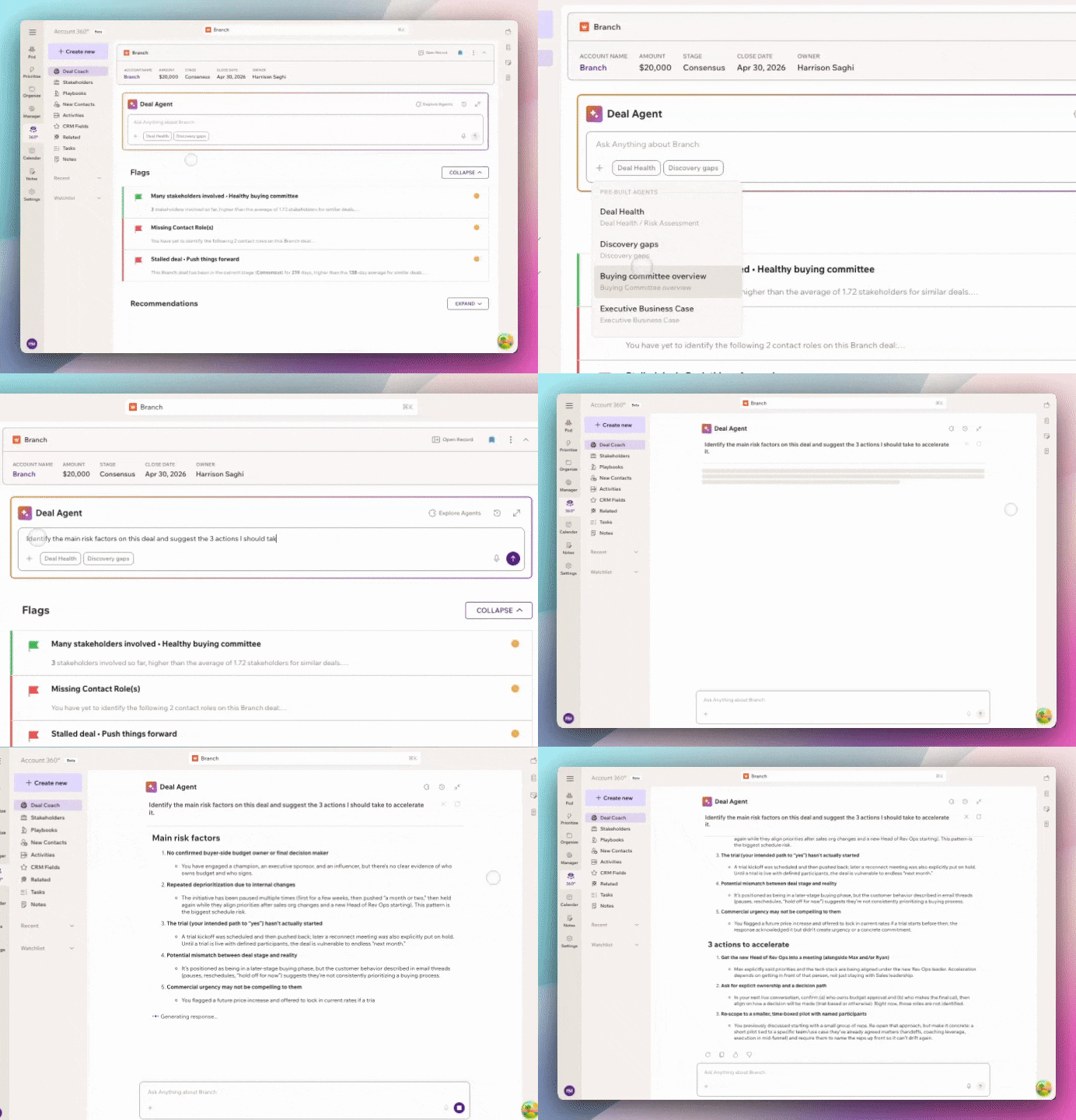
Measuring AI agent success is tricky because the most obvious metric (revenue) has too many confounding variables. Use a layered measurement approach:
Adoption metrics (week 1-4): How many reps are using agents? How often? Which agents get the most runs? If adoption is flat after four weeks, the problem is almost always accessibility or relevance, not capability.
Efficiency metrics (month 1-3): Time saved on meeting prep. Reduction in manual CRM updates. Fewer missed follow-ups. These are the early signals that agents are removing operational burden.
Quality metrics (month 2-6): CRM field completeness. Deal flag accuracy (do the risks agents identify match what actually happens?). Meeting prep quality (are reps going into calls better prepared?). These take longer to measure but reveal whether agents are producing real intelligence.
Pipeline metrics (month 3-6): Deal velocity. Stage progression. Win rates by segment. These are the outcomes that justify the investment, but they require enough time and data to be meaningful.
The mistake most teams make is measuring only pipeline metrics too early, seeing no signal, and pulling the plug before the adoption and efficiency layers have had time to develop.
You do not need a six-month roadmap to start. Here is a practical first-week plan:
The teams that succeed with autonomous AI agents are not the ones with the biggest budgets or the most sophisticated tech stacks. They are the ones that start small, connect the right data, build trust gradually, and embed agents into the workflow instead of beside it.
If you are ready to see how this works in practice, book a demo to see how Pod's AI agents turn deal context into daily execution for your team.


