Want to close more deals, faster?
Get Pod!
Fill out the form and book your demo today.
Thank you for subscribing!
Oops! Something went wrong. Please refresh the page & try again.

Stay looped in about sales tips, tech, and enablement that help sellers convert more and become top performers.

The term "AI agent" has the same problem "growth hacking" had in 2014. Every vendor is claiming it, the category is so crowded that any conference badge can pass for expertise, and the buyers who are actually cutting checks are having a hard time separating real capability from clever positioning. For sales leaders, this is expensive. A sales organization that buys the wrong AI tool does not just waste license spend. It also burns change-management capital that is much harder to rebuild. When reps are asked for the second or third time to adopt "the new AI thing," trust fades fast.
This piece is built for sales leaders who have already heard the buzzwords and want a cleaner filter before their next demo. We will walk through what an AI sales agent actually is, why the difference between a chatbot, a copilot, and an agent matters more than most people make it sound, and what you can ask any AI vendor to cut through the pitch. If you have read five categories of AI in sales, this is the next layer down: once you have accepted that "AI" is too broad, this is how you tell the tools apart.
A quick reality check on how crowded this AI agent category has become. Salesforce's 2026 State of Sales research found that 54% of sellers have already used AI agents in their work, and nearly nine in ten expect to by 2027. At the same time, Gartner forecasts that more than 40% of agentic AI projects will be canceled by the end of 2027 due to unclear business value and weak controls. The mismatch between those two numbers is the whole reason this article exists.
Three things happened in parallel that collapsed the category into mush.
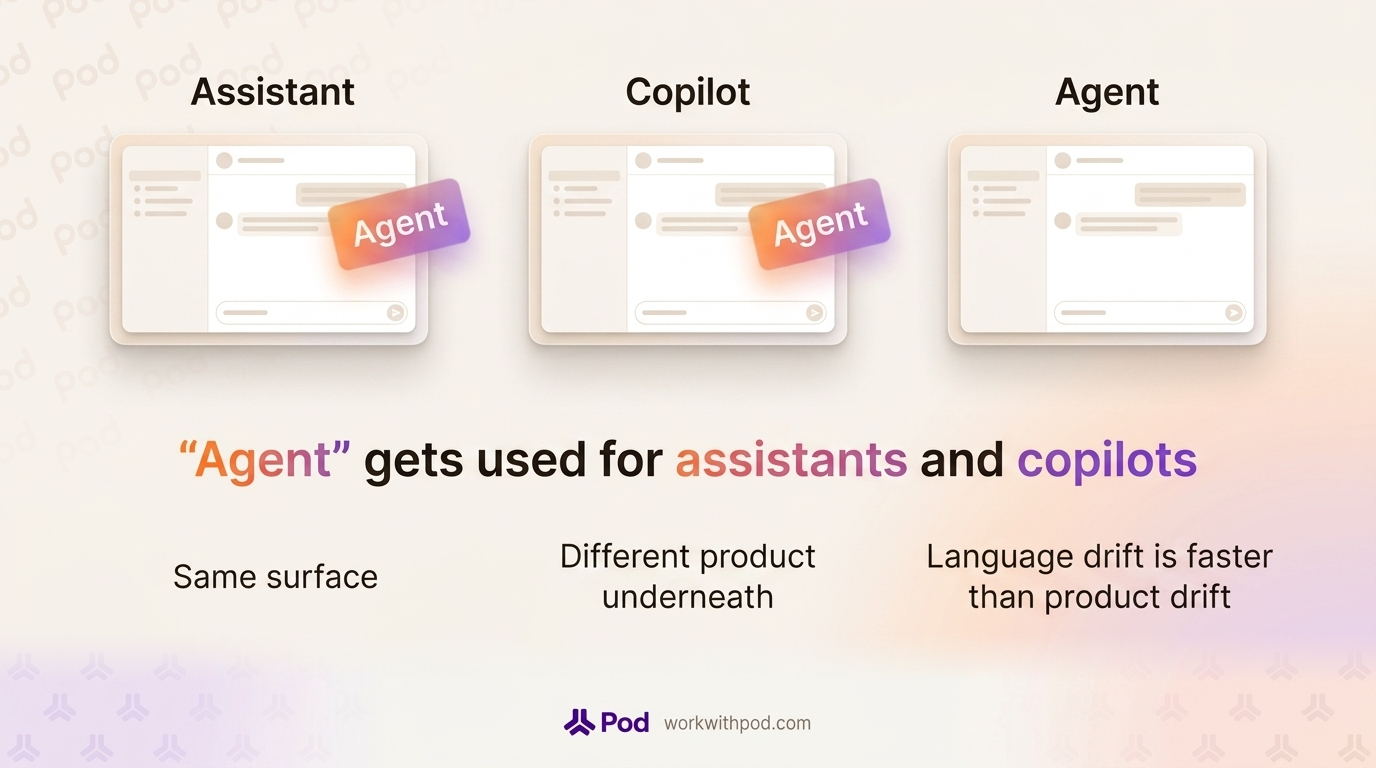
First, every product that used to be "an AI assistant" or "an AI copilot" rebranded as "an agent." The word looked better on a slide, and it did not require a product change. Second, the underlying models have become good enough that almost any interface can be wrapped in a chat experience, so the user-facing surfaces of a chatbot, a copilot, and an agent can now look identical from the outside. Third, buyers are under pressure to sound current, so they use "agent" the same way their vendors do. The language drift is faster than the product drift.
The cost for a sales leader is that when you listen to three AI pitches in the same week, you cannot always tell what is actually different under the hood. This matters because the three categories solve different problems, and getting the wrong category leads to a shelfware renewal in 18 months.
An AI sales agent is a software system that uses a language model to reason about a deal, plan the next step, and take that step across the seller's tools, with human approval where it matters. It is not a chat window with a better personality. The two things that distinguish it from the tools that came before it are context depth (the agent works from live deal data, not a one-off prompt) and the ability to act, not only answer.
The autonomy line is the one that matters most for sales. A chatbot cannot open the CRM on its own. A copilot can draft an email but will wait for you to ask. An agent watches the deal and does something about it, within the boundaries you set. That is why the same underlying LLM can show up as any one of the three categories, depending on how the product is wired around it.
It helps to pin each of these down before putting them in motion.
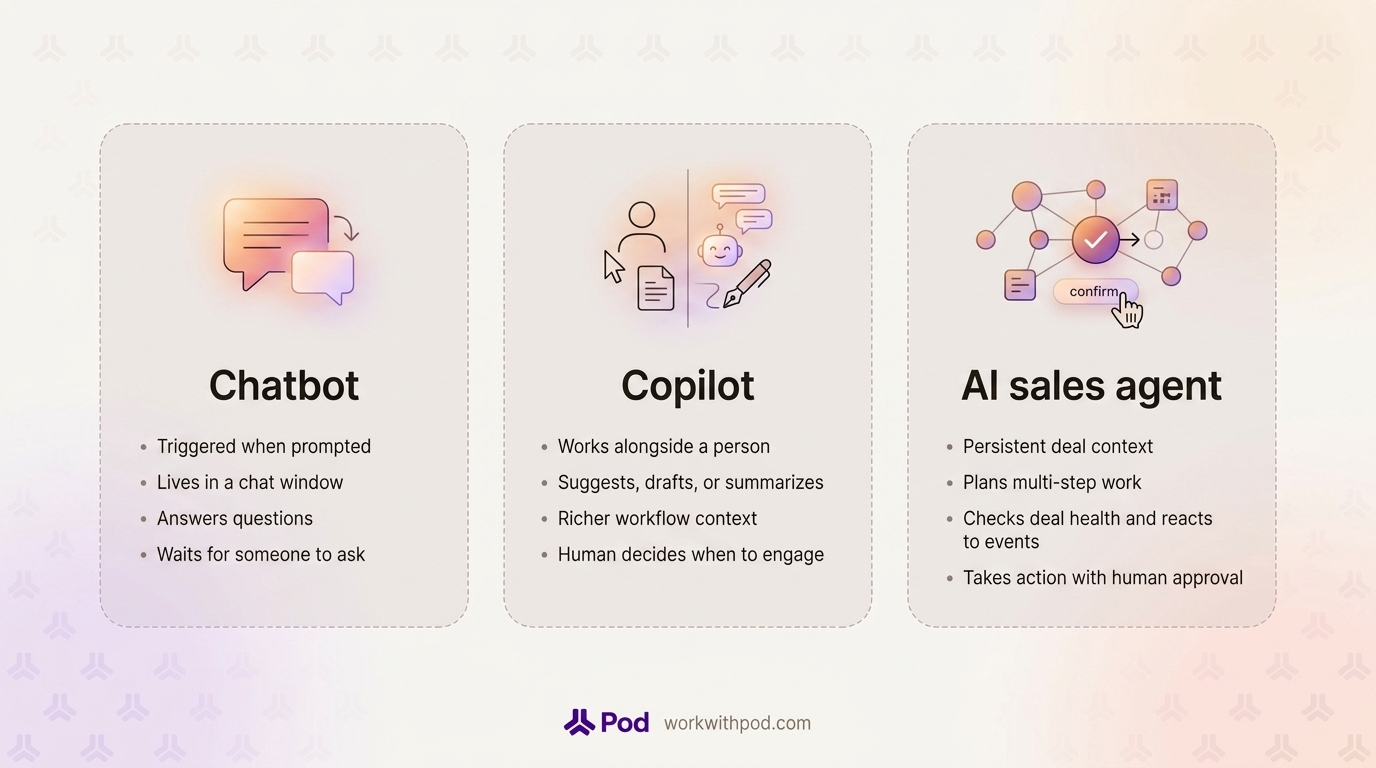
A chatbot is a conversational interface that responds when prompted. It can be rule-based (the old kind) or generative (the new kind), but it lives inside a chat window, and its main job is to answer questions. In a sales context, this usually means a website widget, an internal knowledge base Q&A box, or a CRM add-on that returns information when requested. A well-built chatbot can be useful. It can tell a rep "what is our refund policy" or "which case study covers retail customers." What it does not do is notice a deal slipping. It waits for someone to ask.
A copilot is an AI assistant that works alongside a person in an existing workflow and offers suggestions, drafts, or context on demand. Microsoft has done a lot of the definitional work here, describing a copilot as a tool that is with you when you ask. In sales, a copilot typically lives in the CRM, the email client, or a conversation intelligence tool. It writes follow-up drafts when asked. It summarizes a call you just reviewed. It suggests the next step when you open a deal. Copilots are more useful than chatbots because they have richer context, but the triggering logic is the same: the human decides when to engage.
An AI sales agent has persistent context on a set of deals, a reasoning loop that lets it plan multi-step work, and the ability to take action, with human-in-the-loop approval where the blast radius is real. It does not wait to be asked. It checks deal health on a schedule, reacts to events like a new email from the champion or a change in close date, and either performs an action inside its authority (for example, drafting a note on a deal and routing it for approval) or surfaces a recommendation to the rep who owns the account.
The practical difference is timing and initiative. A chatbot is a tool you go to. A copilot is a tool you work with. An agent is a colleague who notices things and raises them, sometimes by taking the first step.
Framework tables are fine, but the difference between these three categories only lands when you run the same situation through all of them. So here is the situation.
You have a $240K ARR deal. The close date is two weeks out. Two months of strong engagement. MEDDPICC is clean on paper: a named economic buyer, a written decision criteria doc, and a champion in the director-of-ops role who has been your strongest advocate. Then the champion goes quiet. No reply to the last two emails. No response to a Slack connect request. The last call was ten days ago and ended well. Your AE has fifteen other deals open and is not watching this one hour by hour.
This is the most common at-risk pattern in B2B sales. It is also the exact moment where the three AI categories reveal themselves.
Nothing, until someone notices.
If the AE eventually types "how do I re-engage a quiet champion" into the chatbot, they will get a generic answer: send a value-add email, loop in a second stakeholder, ask for five minutes rather than thirty. The advice is not bad. But the chatbot does not know this deal exists. It does not know that the champion's last email was ten days ago, that the close date is twelve business days out, that there is no second champion mapped, and that sentiment has drifted from positive to flat across the last three touches. The AE has to notice the problem, translate it into a question, and then apply generic advice to specific facts. By then, the deal may already be lost.
A copilot helps the moment the AE opens the deal.
The AE pulls up the account in the CRM, and the copilot does its job. There is a panel that says: "This deal has gone quiet. Would you like a draft follow-up email to the champion?" The AE clicks yes. The copilot generates a reasonable email in the rep's voice, pre-filled with context from the last call. The AE edits two sentences and hits send. Good.
But look at what the copilot did not do. It did not flag this deal until the AE opened it. It did not notice that there is no second champion in the buying committee. It did not cross-reference the email thread, the transcript from ten days ago, and the fact that the close date has not been updated to reflect the stall. It did not write a note for the Monday pipeline review. It waited. That is the definition of a copilot: very helpful when invited in, invisible when not.
For AEs who only have three open deals, that is fine. For AEs carrying fifteen, the "invisible when not invited" part is the problem. The deals that need the most help are the deals the AE is least likely to open.
An AI sales agent does not wait for the AE to open the deal.
A deal-scoped agent is running on a schedule and in response to events. Every morning it checks each of the reps' active deals for the same dozen signs of trouble: stalled touchpoint cadence, unanswered emails from the last seven days, sentiment shifts, close date realism, stakeholder coverage against what similar deals needed when they closed. When the champion stops responding, the agent does not need to be asked. It detects the pattern, connects it to the close date, and starts working.
That is what "agent" means in a sales context. Not a smarter chat window. A system that has context, reasons about what to do, and takes the first step, with the rep's approval, where it counts. The same autonomy loop can be extended to many other sales motions, which we cover in depth in workflows reps can hand off.
If you remember nothing else from this piece, remember these three. When a vendor tells you their product is an AI agent, check whether all three are present. If they are not, it is probably a copilot in agent clothing.
A true agent carries live context about the deal it is working on. That means CRM fields, email history across all connected inboxes, transcripts from every call on every recording platform the team uses, calendar events, notes, and whatever methodology the team follows. Crucially, the context updates. If an email lands at 3:14 pm, the agent knows at 3:15 pm, not at the next manual refresh. Without persistent context, the best a system can do is smart one-off responses, which is the copilot ceiling.
An agent has to be able to plan across steps. "The champion went quiet" is not a single question. It is a chain:
A copilot handles one step at a time when asked. An agent holds the plan in mind and moves through it. This is why the underlying model matters less than the agent framework around it. Any modern LLM can write an email. Very few products can chain five decisions together without the human manually clicking through each one.
The clearest giveaway of a real agent is whether it does something when nobody asks. Scheduled runs, triggered runs on events like "meeting ended" or "stage changed," proactive alerts surfaced in Slack or the homepage: these are the difference between a tool you have to remember to use and a system that works in the background. Human approval on write actions is a design choice for trust, not a limitation on autonomy. The question is whether the agent initiates.
Pod's AI Agent Builder exists to give sales teams all three of those properties inside the agents they run on their pipeline, including pre-built agents, workspace agents their RevOps team configures, and personal agents an AE sets up for their own book. The category test above is the same test we would ask a sales leader to hold us to.
Bring these to your next demo. They are designed to be hard to answer with a marketing slide.
1. What does your product do when I do not open it?
A chatbot does nothing. A copilot waits. An agent runs. Ask the vendor to walk through a 24-hour window where the user never logs in. If the answer is "nothing happens," the product is a copilot at best.
2. What systems does your agent take action on, and what requires my approval?
The right answer is specific: "It writes to these CRM fields, drafts emails in Gmail and Outlook, posts to Slack, and leaves notes on the deal record. Write actions require human approval. Read-only actions run without approval." If the vendor cannot list the write surfaces, the product is probably read-only, and the word "agent" is decorative.
3. How does your agent show its work?
A trustworthy agent cites its sources. If it says "this deal is at risk," ask where that conclusion came from. The answer should be specific data: which emails, which transcript segments, which CRM fields. Black-box, 'it just knows" is a red flag. Without source transparency, neither the rep nor the manager can trust the recommendation, and untrusted recommendations get ignored.
4. What happens when I want the agent to do something custom for my team?
Every sales team has proprietary context: internal playbooks, a methodology variant, a unique qualification framework, a strange pricing quirk. Ask how the agent picks up that context. Does the product support custom agent definitions? Can a RevOps admin create a workspace agent that uses an internal playbook? Can you connect a data source that the vendor does not natively integrate with? If the answer is "we will build that for you," the platform is not extensible, and your team will outgrow it in two quarters.
Before the next pipeline review, pick one stalled deal and mentally run the three-tool test on it. What would a chatbot, a copilot, and a real agent each do about that deal in the next 24 hours? The answer will tell you which category your team actually needs, and it will make every vendor conversation from here cleaner.
If you want to see an AI agent do this on a live pipeline, we would like to show you. Book a demo and bring a deal you are worried about.